How to add a booking link to Instagram
For a lot of appointment businesses, Instagram is where new clients find you first. They see your work, they like it, and then they want to book. The fewer steps between that moment and a confirmed appointment, the more of those people actually book. Here is where to put your booking link so it takes a tap or two.
Put the link in your bio
Your bio is the first place people look. Open your profile and tap Edit profile Links Add link. Paste your booking link, give it a clear title such as “Book an appointment”, and tap the tick to save.
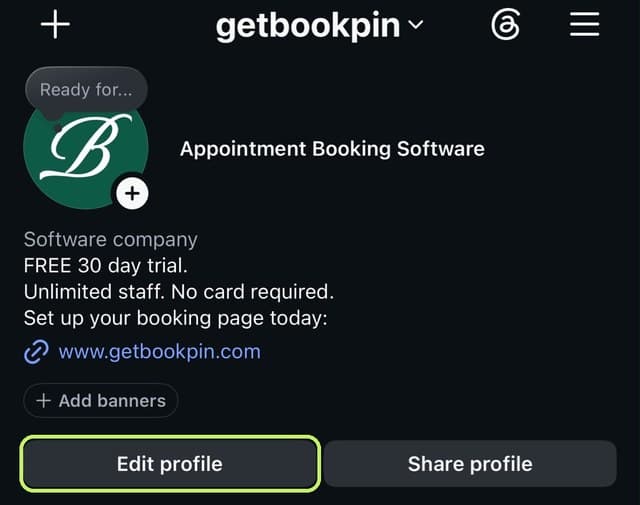
1On your profile, tap Edit profile.

2Tap Links.
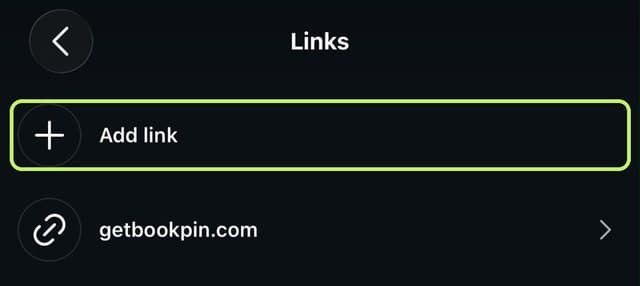
3Tap Add link.
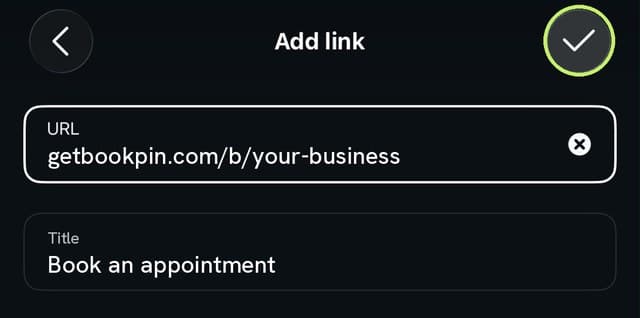
4Paste your link, add a title and tap the tick.
Instagram lets you add up to five links, but only the first one shows on your profile without an extra tap. Put your booking link first.
What about Instagram’s Book now button?
Business profiles can show a Book now button, but it only works with a limited list of booking providers that partner with Instagram, and you need an account with one of them. If your booking system isn’t on that list, your bio link does the same job: one tap from your profile to your booking page.
Add the link to your Stories
Every account can add a link to a Story. Create a Story, tap the sticker icon, choose Link and paste your booking link. You can change the sticker text to something like “Book now”.
Stories work well for gaps you want to fill: a cancellation tomorrow, a quiet afternoon this week, or new dates opening up.
Keep it in a Highlight
Stories disappear after a day. Save your booking Story to a Highlight called “Book” and it stays on your profile, just under your bio, for anyone who visits later.
Reply to messages with the link
When someone messages to ask if you have anything on Friday, send your booking link with a short reply. They can see every free time themselves and pick one, instead of a back and forth that might end with no booking at all. Keep the reply saved on your phone so you can paste it in seconds.
Make the link easy to trust
Send people straight to your booking page rather than a page full of other links. When they land, they should see your business name, your services and prices, and free times, so it is obvious they are in the right place.
A quick checklist
- Booking link first in your bio links
- A link sticker on Stories when you have times to fill
- A “Book” Highlight on your profile
- A saved reply with your link for messages
- Test the link on your own phone
Your link in Bookpin
Every Bookpin business gets its own booking page with its own link. You’ll find it in Settings, then Booking page, with a button to copy it and short steps for Instagram, Google and your website. Clients book from their phone in seconds, with no app to download and no account to create.
See everything that’s included on the features page.